Loading DLS Editor…
DLS Editor plugin v3.1.0
Searching for a DLS kit template usually means digging through forums for a random image link and hoping it actually fits the game correctly. Our free tool takes a different approach: it starts from a real Dream League Soccer kit template — with the shirt, sleeves, shorts, and socks already laid out exactly the way the game reads them — and lets you customize every part of it yourself, right in your browser.
No app to install, no account to create — open the template, design your kit, and download it as a PNG ready to import into DLS.
What Is a DLS Kit Template?
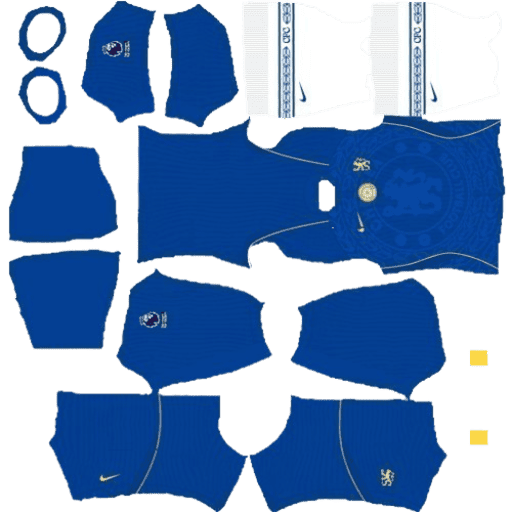
A DLS kit template is the flat, unfolded layout Dream League Soccer uses to wrap a texture around a player’s 3D kit — the shirt front, shirt back, both sleeves, both shorts panels, sock bands, and tag areas all arranged as separate panels in a single image. A kit image that isn’t built on this exact layout will look distorted or misaligned once it’s actually applied in-game.
Our DLS kit template tool is built directly on this real layout, not a generic jersey mockup, so anything you design on it comes out sized and shaped correctly the first time.
Customize the DLS Kit Template: Key Features
- Tap-to-select editing. Tap any part of the kit template — a sleeve, the shirt front, the shorts, a sock band — and a color picker opens for just that panel.
- Real design patterns, not just flat colors. Every panel of the template supports Solid, Vertical Stripes, Hoops, Diagonal Stripes, Halves, a diagonal Sash, and Checkerboard, each with two colors and an adjustable scale.
- Upload your own texture. Have a specific print, gradient, or pattern in mind? Upload any image and it’s shaped to fit the exact panel of the template you applied it to.
- Custom logo. Add your own team crest or sponsor logo onto the template, then drag to position and resize it.
- Team text, player name, and player number. Fully customizable text with adjustable color and size.
- Undo, redo, and reset. Experiment freely — every change is reversible, and Reset restores the template to its starting point in one tap.
- Instant download, no waiting. Your finished kit exports as a 512×512 PNG straight to your device — nothing is uploaded anywhere, and nothing to sign up for.
How to Customize the DLS Kit Template: Step-by-Step
- Open the DLS kit template tool and select Classic Kit, or pick one of the ready-made kits to start from an existing design.
- Tap a panel on the template — for example, the shirt front — to select it.
- Choose a pattern and colors. Pick Solid for a flat color, or one of the pattern styles (stripes, sash, checkerboard, etc.) for something more distinctive, then set the color(s).
- Repeat for every panel of the template — sleeves, shorts, socks, tags — until the whole kit looks right.
- Add your logo. Tap Logo, upload a PNG or JPG, then drag it into place and resize with the corner handle.
- Add team text, player name, and number, and adjust their color and size.
- Tap Download Kit. Your finished 512×512 PNG saves straight to your device — check your phone’s gallery or your computer’s downloads folder.
- Import it into Dream League Soccer as a custom kit using the file you just downloaded.
Design Ideas: Recreate Any Team’s Kit on the Template
Because every panel of the template supports real patterns instead of just flat colors, you can approximate the signature look of almost any kit:
- Striped kits (Newcastle, Juventus-style stripes) — use Vertical Stripes on the shirt front and back, and adjust the Pattern Scale slider to match the stripe width you want.
- Sash kits (River Plate, Boca Juniors-style) — use the Sash pattern for a diagonal band through the shirt.
- Checkerboard kits (Croatia-style) — use the Checkerboard pattern and set a smaller scale for tighter squares.
- Hooped kits (Celtic-style) — use Hoops (horizontal stripes) with a wider scale.
- Anything else — upload a reference texture or pattern image directly and it’ll be fitted to the panel automatically.
Why Use This DLS Kit Template Instead of a Random Kit Image?
- It’s built on the real DLS kit template layout, not a generic jersey shape, so panels line up correctly on the 3D player model.
- It’s completely free, with no account, login, or watermark.
- It works on mobile, where most Dream League Soccer players actually play.
- Your kit is downloaded, not uploaded anywhere — the design process stays private to your device.
- You’re not limited to solid colors — the built-in pattern engine covers stripes, sashes, checkerboards, and custom textures.
Frequently Asked Questions
What is a DLS kit template?
A DLS kit template is the flat, panel-by-panel layout Dream League Soccer uses to wrap a kit texture onto a player model — including the shirt front, shirt back, sleeves, shorts, and socks, all arranged in a single image.
Where can I get a free DLS kit template?
You can use and customize a real DLS kit template directly in your browser, free, with no account needed.
Can I customize a DLS kit template online without downloading software?
Yes. The entire template — colors, patterns, logo, text, name, and number — can be customized directly in your browser on Android, iPhone, or desktop.
What size should a DLS kit template be?
512×512 pixels, which is the format Dream League Soccer expects for kit imports. Every kit exported from this tool is automatically sized correctly.
Can I add my own logo to the kit template?
Yes. Upload a PNG, JPG, or WebP image as your logo, then drag to position and resize it anywhere on the template.
Can I create striped, sashed, or checkerboard kits on the template, not just solid colors?
Yes. Every panel of the template supports Solid, Vertical Stripes, Horizontal Stripes (Hoops), Diagonal Stripes, Halves, Sash, and Checkerboard patterns, each with two adjustable colors.
How do I import my customized kit template into Dream League Soccer?
Download your finished kit as a PNG, then use that file as a custom kit import inside Dream League Soccer.
Is my kit design saved anywhere online?
No. Your kit is generated and downloaded directly in your browser — nothing is uploaded to or stored on a server.
Ready to customize your own kit?
Open the DLS kit template tool now and create your custom Dream League Soccer kit in minutes.
Ready to customize your own kit? Open the DLS kit template tool now and create your custom Dream League Soccer kit in minutes.