Updated June 2026 · World Cup Edition

DLS Kit — 512×512 Dream League Soccer Kits 2026

The biggest free collection of DLS kit URLs for every club, league, and national team. Copy any link, paste into Dream League Soccer, and your kit is ready in seconds. All kits are 512×512 PNG — the exact format DLS 26 requires.

500+
Club Kits
48
World Cup Teams
512×512
PNG Format
Free
No Sign-up

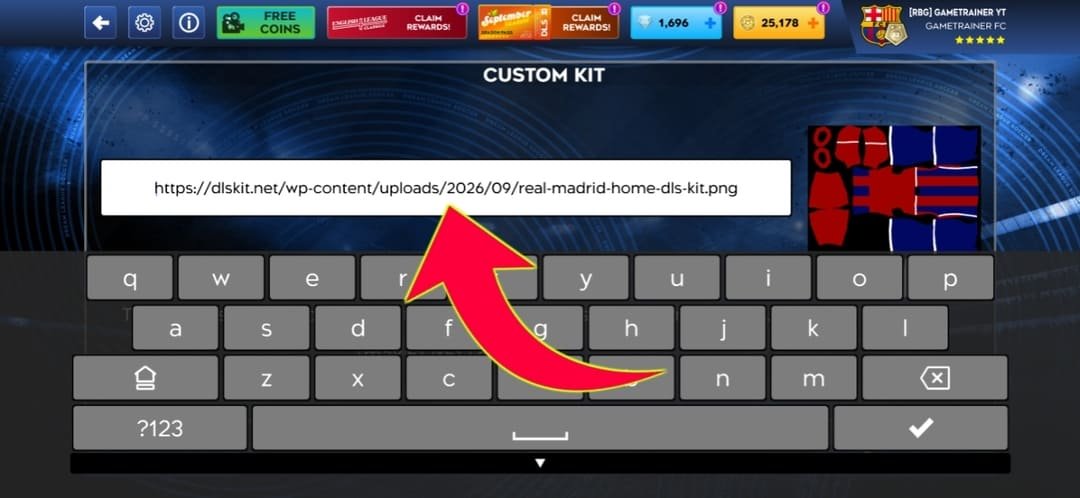
A DLS kit is a 512×512 pixel PNG image you load into Dream League Soccer to dress your squad in the real colours of any football club or national team. Paste the image URL into the game's kit screen and the full home, away, or third strip appears on your players instantly. Every kit URL on this page is verified, hotlink-enabled, and loads inside DLS 26 without errors on the first try. No resizing, no converting, no downloading — just copy and paste.

Featured DLS Kits for 2026

The most-searched DLS kits this season. Every URL is verified, 512×512 PNG, and imports into DLS 26 right away. Each club has home, away, third, and GK kit URLs available.

🏠 Home Kit
✈️ Away Kit
⚡ Third Kit
🧤 GK Kit
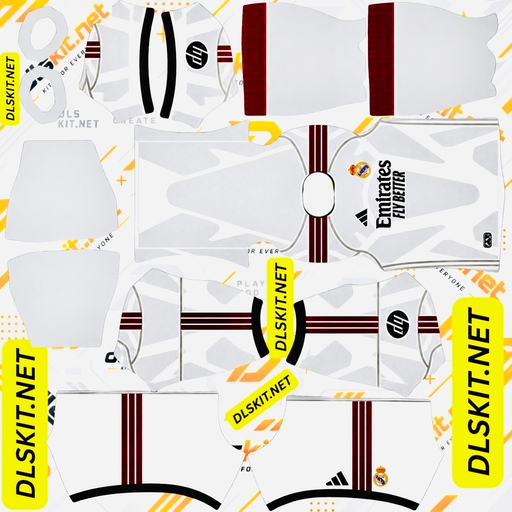
Real Madrid DLS kit 512x512 2026

Real Madrid

512×512 PNG
HomeAwayThirdGK
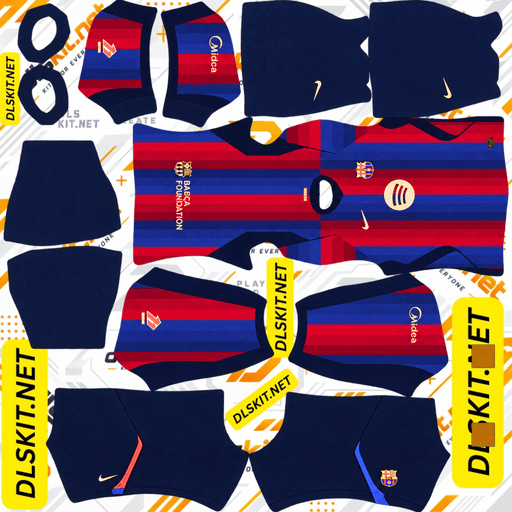
Barcelona DLS kit 512x512 2026

Barcelona

512×512 PNG
HomeAwayThirdGK
PSG DLS kit 512x512 2026

PSG

512×512 PNG
HomeAwayThirdGK
Liverpool DLS kit 512x512 2026

Liverpool

512×512 PNG
HomeAwayThirdGK
Manchester City DLS kit 512x512 2026

Man City

512×512 PNG
HomeAwayThirdGK
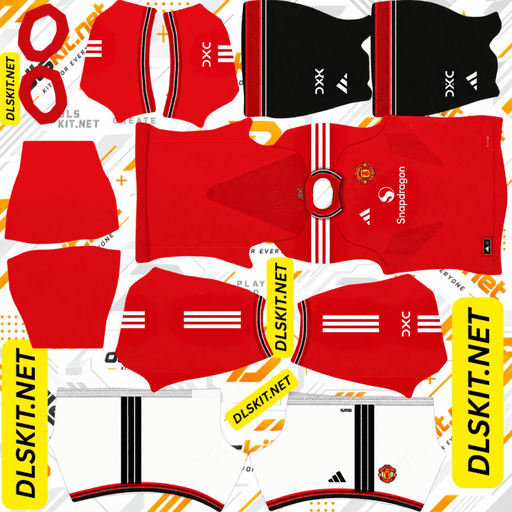
Manchester United DLS kit 512x512 2026

Man United

512×512 PNG
HomeAwayThirdGK
Al Nassr DLS kit 512x512 2026

Al Nassr

512×512 PNG
HomeAwayThirdGK
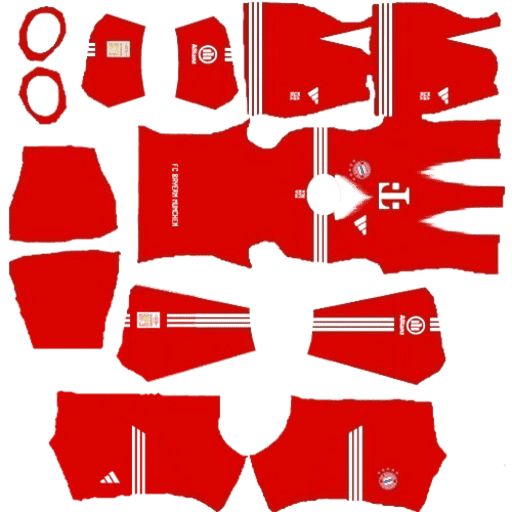
Bayern Munich DLS kit 512x512 2026

Bayern Munich

512×512 PNG
HomeAwayThirdGK
Arsenal DLS kit 512x512 2026

Arsenal

512×512 PNG
HomeAwayThirdGK
Juventus DLS kit 512x512 2026

Juventus

512×512 PNG
HomeAwayThirdGK
Al Hilal DLS kit 512x512 2026

Al Hilal

512×512 PNG
HomeAwayThirdGK
Ghana DLS kit 512x512 2026

Ghana

512×512 PNG
HomeAwayGK

🏆 World Cup 2026 Kits — All 48 Nations Available

FIFA World Cup 2026 is the biggest tournament in history — 48 nations, 3 host countries (USA, Canada & Mexico), and the most-searched DLS kit topic right now. Every national team kit URL below is 512×512 PNG, verified, and imports into DLS 26 instantly.

Most-Searched World Cup 2026 DLS Kits

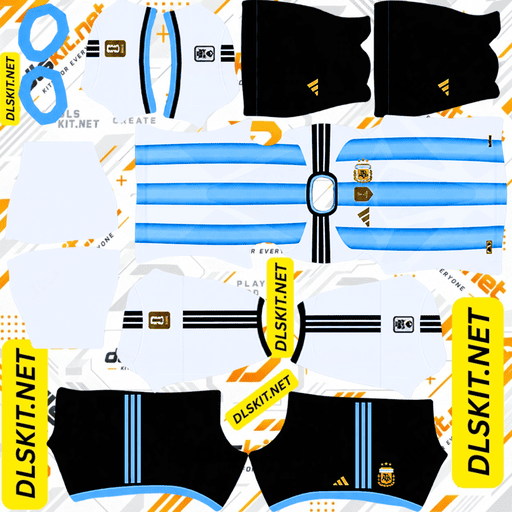
Argentina DLS kit World Cup 2026 512x512

🇦🇷 Argentina

Champions · 3 Stars
HomeAwayGK
Brazil DLS kit World Cup 2026 512x512

🇧🇷 Brazil

5× World Champions
HomeAwayGK
France DLS kit World Cup 2026 512x512

🇫🇷 France

Les Bleus
HomeAwayGK
England DLS kit World Cup 2026 512x512

🏴󠁧󠁢󠁥󠁮󠁧󠁿 England

Three Lions
HomeAwayGK
Spain DLS kit World Cup 2026 512x512

🇪🇸 Spain

La Roja
HomeAwayGK
Germany DLS kit World Cup 2026 512x512

🇩🇪 Germany

Die Mannschaft
HomeAwayGK
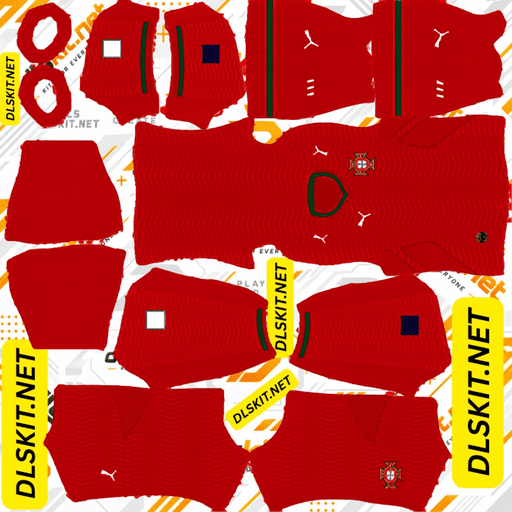
Portugal DLS kit World Cup 2026 512x512

🇵🇹 Portugal

Seleção
HomeAwayGK
USA DLS kit World Cup 2026 512x512

🇺🇸 USA

Host Nation
HomeAwayGK

Browse DLS Kits by League

Each league page has home, away, third, and GK kit URLs for every club. Tap a league to see the full collection.

🏆

World Cup 2026 Kits — All 48 Nations Available

FIFA World Cup 2026 is hosted across USA, Canada & Mexico. Get all 48 national team DLS kit URLs — updated with the latest World Cup edition strips.

View All 48 Kits →

All 48 World Cup 2026 Groups — DLS Kit Coverage

ConfederationTeamsNotable Nations
UEFA (Europe)16 teamsFrance, England, Spain, Germany, Portugal, Italy, Netherlands
CONMEBOL (S. America)6 teamsArgentina, Brazil, Uruguay, Colombia, Ecuador
CONCACAF (N/C America)6 teamsUSA, Mexico, Canada, Jamaica, Panama
CAF (Africa)9 teamsMorocco, Senegal, Nigeria, Ghana, Egypt
AFC (Asia)8 teamsJapan, South Korea, Saudi Arabia, Australia, Iran
OFC (Oceania)1 teamNew Zealand
Inter-continental play-off2 teamsTBC

Every nation in the table above has a dedicated DLS kit page on this site with home, away, and GK kit URLs in 512×512 PNG format — all updated with the official World Cup 2026 edition strips.

What is a DLS Kit URL?

A DLS kit URL is a direct web address that points to a 512×512 PNG image of a football shirt. When you paste this URL into Dream League Soccer's kit screen, the game fetches the image and wraps it around your players' shirt template. The URL must end in .png or .jpg — a link to a webpage that shows the image will not work. The image must also be exactly 512 pixels wide and 512 pixels tall or DLS rejects it at import.

Every DLS kit URL on this page meets both requirements. Images are hosted on a CDN that permits hotlinking, so the kit loads inside the game on the first attempt — no download, no file conversion, no resizing needed.

💡 Pro tip: DLS kit URLs work in Dream League Soccer 24, DLS 25, and DLS 26 — the import system is identical across all versions. A URL that works in one works in all.

How to Use a DLS Kit in Dream League Soccer

Takes about 30 seconds. The steps are the same for home, away, third, and goalkeeper kits.

1

Copy the Kit URL

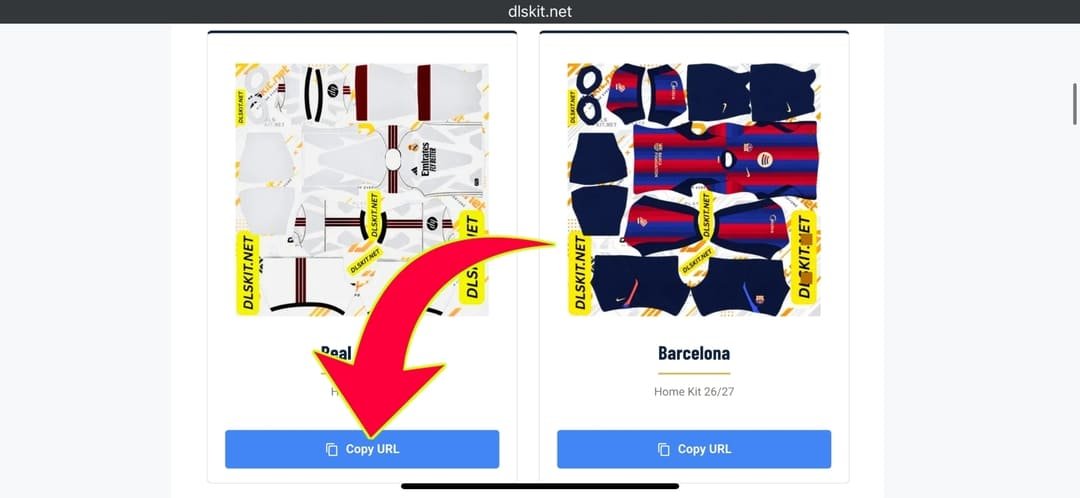
Tap the Copy Kit URL button under any club on this page. The link saves to your clipboard instantly.

2

Open DLS → My Club

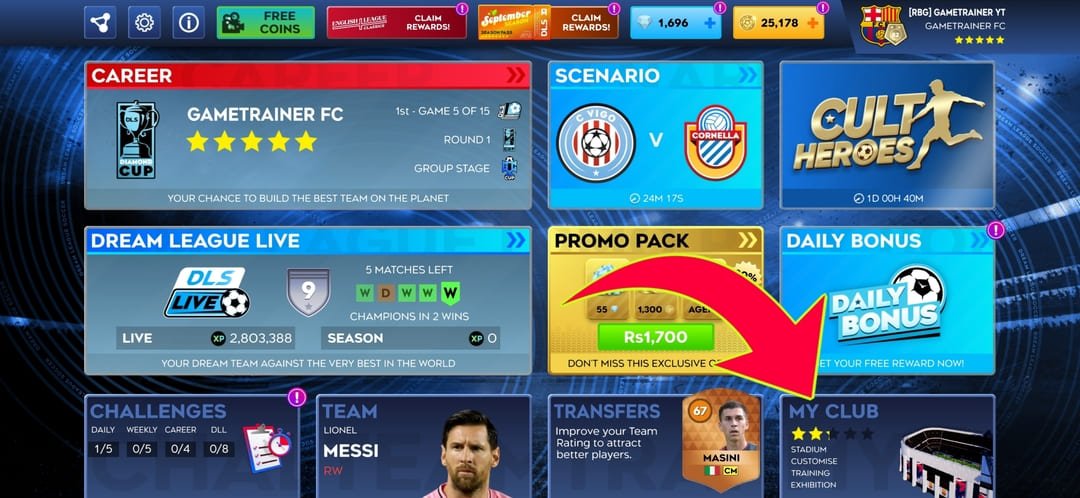
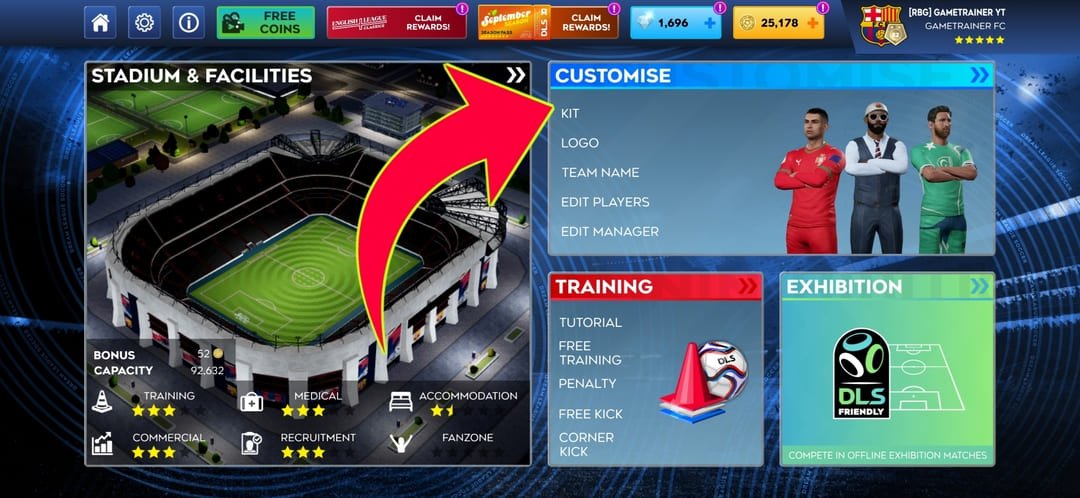
Launch Dream League Soccer, go to My Club, and tap Customize Team from the menu that appears.

3

Choose Kit Type

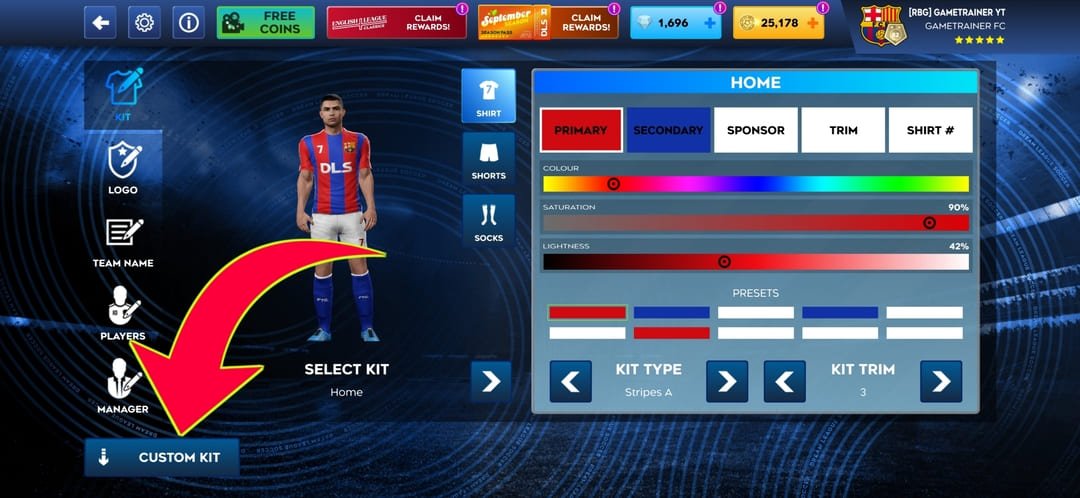
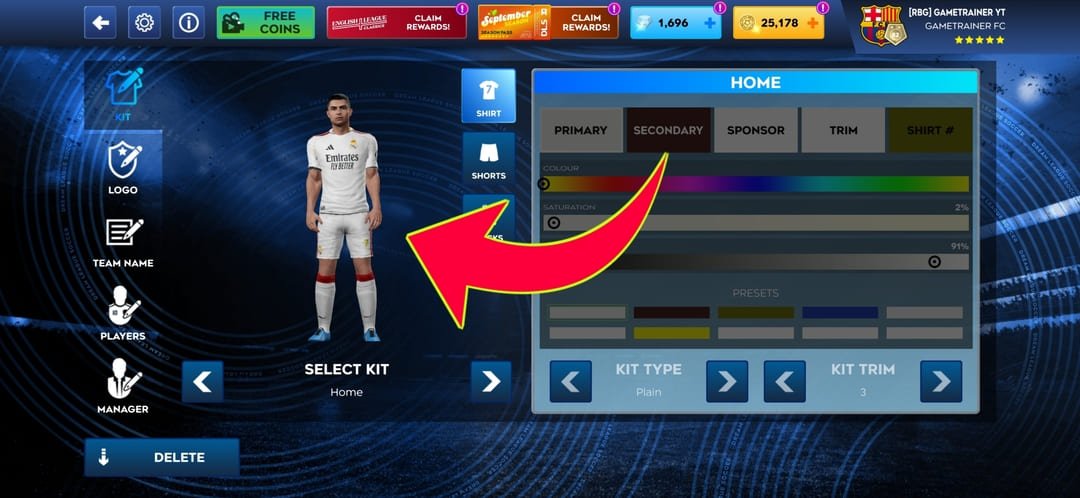
Tap Edit Kit, then choose Home, Away, Third, or Goalkeeper. Each is imported separately with its own URL.

4

Paste URL → Confirm

Tap the Download button, paste the URL you copied, and hit Confirm. The kit applies to your squad instantly.

What Size Are DLS Kits?

DLS kits must be exactly 512×512 pixels in PNG format. Anything smaller looks blurry on the pitch. Anything larger gets rejected by the importer. A transparent or solid background both work — the kit image wraps around the shirt template inside the game engine.

DLS Kit Size and Format Checklist

RequirementDetailWhy It Matters
Width512 pixels exactlyGame rejects non-square images
Height512 pixels exactlyMust match UV template canvas
File typePNG (preferred) or JPGPNG preserves transparency
BackgroundTransparent or solidTransparent blends cleanest
File sizeUnder 1 MBLarger files time out on mobile data
URL formatDirect link ending in .png or .jpgWebpage links always fail
HostingHotlink-enabled CDNGoogle Drive and Dropbox block DLS

Home, Away, Third & Goalkeeper Kit — What's the Difference?

Dream League Soccer lets you import four separate kit URLs per club. Each has a different design and colour scheme. The game automatically uses the correct kit depending on whether you are the home or away side in each match.

🏠 Home Kit

  • Primary club colours
  • Worn in home matches
  • Most iconic strip
  • Available for every club

✈️ Away Kit

  • Contrasting colours
  • Used when colours clash
  • Often bold or experimental
  • Changes every season

⚡ Third Kit

  • Third colour option
  • Used when both clash
  • Most creative design
  • Not every club has one

🧤 GK Kit

  • Fully different design
  • Must contrast outfield kit
  • Usually brighter colours
  • Separate URL from outfield

DLS Kit Manufacturers — Nike, Adidas, Puma & More

Every DLS kit replicates the real-world shirt made by the club's official kit manufacturer. Knowing which brand makes your club's kit helps you find the most accurate 512×512 version since each manufacturer uses different collar styles, badge placements, and sleeve templates. Here are the main kit makers represented in DLS 2026:

✔️

Nike

PSG, Liverpool, Chelsea, Barcelona, Brazil, England

✔️

Adidas

Real Madrid, Arsenal, Bayern Munich, Argentina, Germany

✔️

Puma

Man City, AC Milan, Borussia Dortmund, Saudi clubs

✔️

Macron

Various Serie A and lower-league clubs

✔️

Hummel

Several national teams and Scandinavian clubs

✔️

Castore

Aston Villa, Newcastle United, Rangers

When searching for a specific DLS kit, adding the manufacturer name to your search (for example "Real Madrid Adidas DLS kit 512x512") often returns more accurate results than searching by club name alone.

DLS Kit vs FTS Kit — Are They the Same?

Dream League Soccer (DLS) and First Touch Soccer (FTS) are both made by First Touch Games and both use 512×512 PNG kit images. However, the UV layout — the flat template that determines how the shirt wraps around the player — is slightly different between the two games. A kit designed on the DLS UV template may show panel misalignment if used in FTS, and vice versa.

FeatureDLS KitFTS Kit
Image size512×512 PNG512×512 PNG
File formatPNG or JPGPNG or JPG
UV templateDLS-specific layoutFTS-specific layout
Cross-compatibilityPartial — panels may shiftPartial — panels may shift
Import methodPaste URL in Edit KitPaste URL in Edit Kit
Recommended for DLS✅ Yes⚠️ Only if DLS version unavailable

Every kit URL on this page is designed and tested specifically on the DLS UV template, so it wraps correctly around the in-game player model in Dream League Soccer 2026.

What Is a DLS Kit UV Template?

The UV template is the flat design canvas that shows exactly where each panel of the shirt, shorts, and socks maps onto the 3D player model inside Dream League Soccer. When you design or download a DLS kit, the image must follow this UV layout or the panels will appear in the wrong place on the player — collar elements ending up on the sleeve, sponsor logos shifting to the back, and so on.

The official DLS UV template for 2026 is a 512×512 canvas divided into zones: the front torso panel on the upper-left, the back torso panel on the upper-right, the left and right sleeves below those, and the collar, shorts, and socks in the lower section. Designers place each element in its correct UV zone so the in-game 3D engine wraps it correctly.

💡 Custom kit tip: If you're designing your own DLS kit, download a blank DLS 2026 UV template from a tool like Photopea or Canva, design on top of it, export at 512×512 PNG, upload to ImgBB, and paste the URL into DLS. The template ensures every panel lines up perfectly on your players.

Why Is My DLS Kit Not Loading?

Nine out of ten failures come down to the URL format or image size. Dream League Soccer needs a direct link to the image file — not a link to a webpage that contains the image. Check that your URL ends in .png or .jpg. If it ends in .html, /photo, or anything other than an image extension, DLS cannot read it.

Full DLS Kit Error Guide

Error MessageCauseFix
"Failed to import"Wrong URL type or wrong image sizeUse a direct .png link, 512×512 only
Kit looks blurryImage smaller than 512×512Find or create a 512×512 version
White box around kitJPG with solid background instead of PNGSwitch to PNG with transparent background
Panels misalignedWrong UV template (FTS instead of DLS)Use a kit built on the DLS UV template
"Image not found"Host blocks hotlinking (Drive, Dropbox)Re-upload to Imgur or ImgBB
URL won't pasteClipboard issue on deviceRe-copy or type the URL manually
Wrong colours showHome and away URLs mixed upCheck which kit type screen is open in DLS
Kit not savingNo internet connection at confirm stepConfirm while connected to Wi-Fi or data

Most-Searched DLS Kits Right Now

Search trends shift with the football calendar. World Cup 2026 is driving a huge spike in national team kit searches alongside the usual club kit demand. These are the top searches this month:

  1. Real Madrid DLS kit 2026 — Champions League edition home and away
  2. Argentina DLS kit World Cup 2026 — three-star champion kit, highest trending
  3. Brazil DLS kit World Cup 2026 — yellow home and blue away both searched daily
  4. Al Nassr DLS kit — Ronaldo effect keeps Saudi kits in the top 5
  5. PSG DLS kit 2026 — new Nike strip searched every day
  6. England DLS kit World Cup 2026 — Wembley home white strip trending
  7. France DLS kit World Cup 2026 — dark blue Nike home strip
  8. Barcelona DLS kit 2026 — home and away both in weekly top 10
  9. Liverpool DLS kit 2026 — Premier League title-winner strip
  10. Bayern Munich DLS kit 2026 — 125th anniversary edition
  11. Man City DLS kit 2026 — sky blue home and white away
  12. Inter Miami DLS kit — MLS club with the biggest DLS search volume

How to Make Your Own Custom DLS Kit (512×512)

Designing your own DLS kit or DLS Logo takes about ten minutes using free browser tools. Open Photopea, Canva, or Figma and set the canvas to exactly 512×512 pixels. Download a blank DLS 2026 UV template and place it as your base layer. Design your colours, patterns, collar, sponsor, and badge on top of the UV zones. Export as PNG with transparency on.

Once you have the file, upload it to Imgur or ImgBB — both give you a direct image URL that DLS can read. Copy that URL, paste it into the kit screen in DLS, and your custom strip appears on your squad.

Best Free Tools for Custom DLS Kits

ToolBest ForSkill Level
PhotopeaDetailed designs, layer control, Photoshop-styleIntermediate
CanvaQuick designs using kit templatesBeginner
FigmaClean vector shapes and sharp edgesIntermediate
GIMPAdvanced editing, free desktop appAdvanced
Logo.comAI-generated crests and badgesBeginner

💡 Hosting tip: After designing your kit, always upload to ImgBB or Imgur. Both provide a hotlink-enabled direct .png URL. Never use Google Drive, Dropbox, or Facebook — they wrap images in webpages that DLS cannot load.

DLS Kit Design Guide — What Each Club Kit Looks Like in 2026

Knowing what a kit looks like before you import it helps you pick the right URL and spot a poor-quality copy instantly. Here is a detailed description of every featured club's home kit design in DLS 2026 — colours, collar, sponsor placement, shorts, and socks — so you know exactly what you are importing.

Real Madrid — Home Kit (Adidas · White)

Real Madrid's 2026 home kit by Adidas is built on pure white — the colour Los Blancos have worn at every major trophy in their history. The shirt features a subtle diagonal texture across the chest panels for a premium fabric feel. Gold piping runs along each side from the armpit to the hem, adding a regal touch that references the club's royal identity. The three Adidas stripes run down each shoulder in a slightly darker white-grey rather than a contrasting colour, keeping the clean all-white look intact. The Real Madrid crest sits on the upper left chest in the full embroidered version, with the Adidas logo on the right. A small "15" Champions League patch on the sleeve honours the club's record-breaking fifteenth European title. The shorts are white with gold side trim and the socks are white with thin gold bands at the top. This is the most searched DLS kit URL on the entire platform.

Barcelona — Home Kit (Nike · Blaugrana)

Barcelona's iconic blaugrana home kit for 2026 uses the club's traditional vertical red and blue stripes, designed by Nike. The 2026 edition introduces a slightly textured stripe pattern where the blue and red bands have subtle diagonal shadow lines running through them, giving the fabric a more three-dimensional look at close range. The club crest with the four Catalan bars sits on the left chest in full colour, with the Nike swoosh in white on the right. The Spotify logo appears as the main shirt sponsor across the chest in white. The collar is a deep V-neck in blue with a thin red inner trim. The shorts are deep blue with red Nike branding on the left thigh, and the socks are red with blue and gold hoops. In DLS 2026, Barcelona's blaugrana imports with full colour accuracy at 512×512 and renders sharply on every device.

PSG — Home Kit (Nike · Navy blue)

Paris Saint-Germain's 2026 home kit is built on a deep navy base — almost midnight blue — sharpened by a bold central red stripe edged with geometric gold detailing. The Nike design references PSG's Parisian heritage through subtle architectural shadow patterns embedded into the navy panels. The PSG crest with the Eiffel Tower sits on the left chest, and the Nike swoosh in white on the right. Qatar Airways appears as the shirt sponsor across the chest in white. The collar is a crew neck in navy with thin red and gold inner trim. The shorts are navy with red and gold PSG branding, and the socks are red with navy and gold bands. PSG's navy and red combination is one of the most visually distinctive club kits in DLS 2026.

Liverpool — Home Kit (Nike · Red)

Liverpool's 2026 home kit by Nike is a bold red — the colour Anfield has been painted in since 1964. The shirt features a subtle tonal shadow pattern across the chest referencing the Shankly Gates. The LFC crest with the liver bird sits on the left chest in white and gold, with the Nike swoosh in white on the right. Standard Chartered appears as the shirt sponsor. The collar is a slim V-neck in red with a thin white inner stripe. The shorts are red with white Nike branding on the thigh, and the socks are red with white bands. Liverpool's red home kit is consistently in the top five most-searched DLS kit URLs globally and renders with full colour accuracy at 512×512.

Manchester City — Home Kit (Puma · Sky blue)

Manchester City's 2026 home kit by Puma uses the vivid sky blue that has defined the club since their 1968 First Division title. The shirt features a subtle pinstripe detail across the body panels, a design choice that echoes their legendary 1970s kits. The MCFC crest sits on the left chest, with the Puma logo in white on the right. Etihad Airways appears as the main sponsor. The collar is a round crew neck in sky blue with white inner piping. The shorts are white with sky blue Puma branding, and the socks are sky blue with white bands. Manchester City's sky blue is one of the cleanest colours to import in DLS — no colour rendering issues on any device.

Manchester United — Home Kit (Adidas · Red)

Manchester United's 2026 home kit returns to a stripped-back, commanding design in the club's traditional deep red. The Adidas design features a clean V-cut collar framed with bold black trim — collar, cuffs, and shoulder accents all in black — restoring a traditional look that references United's most successful eras. The three Adidas stripes run down each sleeve in black. The MUFC devil badge sits on the left chest in gold and white, with the Adidas logo on the right. TeamViewer appears as the shirt sponsor. The shorts are white with black Adidas branding, and the socks are black with red and white bands. This is one of the most-searched DLS club kit URLs in Europe.

Bayern Munich — Home Kit (Adidas · Red)

Bayern Munich's 2026 home kit by Adidas is a rich Bavarian red with white side panels and black detailing at the collar and cuffs. The 2026 edition includes a special 125th anniversary patch on the sleeve, making it one of the most collectable kit versions in DLS this season. The FCB crest with the Bavarian diamond shield sits on the left chest, with the Adidas logo in white on the right. T-Mobile appears as the shirt sponsor. The collar is a slim crew neck in red with white inner piping. The shorts are red with white side stripes, and the socks are red with white bands. Bayern's red home kit imports cleanly in DLS with no colour bleed between the red body and white side panels.

Arsenal — Home Kit (Adidas · Red)

Arsenal's 2026 home kit by Adidas keeps the classic red body paired with crisp white sleeves — the defining combination of the Gunners since Herbert Chapman introduced the white sleeves in the 1930s. The red body has a subtle shadow diamond pattern across the chest panels. The three Adidas stripes run along the white sleeves in red. The Arsenal cannon badge sits on the left chest in gold and white, with the Adidas logo on the right. Emirates appears as the shirt sponsor. The collar is a slim crew neck in red with white inner trim. The shorts are white with red Adidas branding, and the socks are white with red bands. Arsenal's red and white combination is instantly recognisable in DLS match screens.

Al Nassr — Home Kit (Adidas · Yellow)

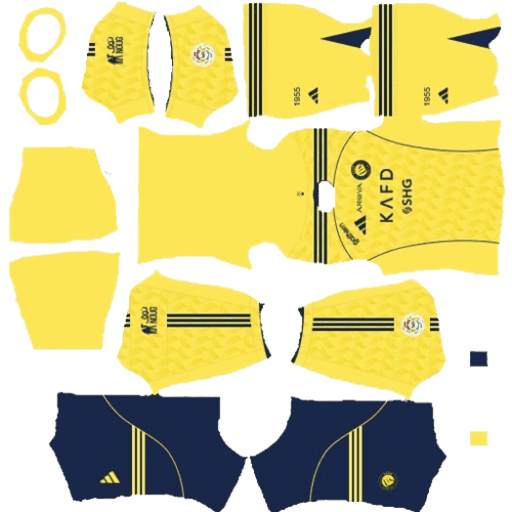
Al Nassr's 2026 home kit by Adidas is built on a vivid golden yellow base — one of the boldest home kit colours in the Saudi Pro League. The shirt features blue shoulder panels with gold Adidas three stripes running down each arm. The Al Nassr crest with the star sits on the left chest. NOON appears as the shirt sponsor across the chest. The collar is a slim V-neck in blue with gold inner trim. The shorts are blue with gold Adidas branding, and the socks are yellow with blue bands. Al Nassr became one of the most searched DLS kits on the platform when Cristiano Ronaldo joined in January 2023, and that search volume has remained elevated ever since.

The History of DLS Kits — How Kit Customisation Became the Heart of Dream League Soccer

Dream League Soccer was first released by First Touch Games in 2012. In its earliest versions, teams played in generic unlicensed kits — solid colour strips with no club badges or sponsor logos. The kit customisation system that DLS is now famous for was introduced as the game grew, allowing players to paste a URL into the game and have the image applied to their squad. This single feature transformed DLS from a basic mobile football game into a global community built around kit sharing, custom designs, and football identity.

The 512×512 pixel standard was established early in the game's development as the sweet spot between image quality and file size on mobile connections. At 512×512, a PNG image is sharp enough to look clean on any smartphone screen while small enough to load quickly over 3G and 4G mobile data — the connection type used by the majority of the game's player base in Africa, Asia, and South America. This is why the "512×512" phrase has become inseparable from DLS kit culture — players search for it specifically because anything smaller looks blurry in-game.

The first wave of DLS kit websites appeared around 2016 as the game's popularity exploded in developing markets. Players in Nigeria, Ghana, Indonesia, Pakistan, and Brazil — countries where DLS became the dominant mobile football game — began building Blogger and WordPress sites sharing kit URLs. By 2018, coinciding with the FIFA World Cup in Russia, DLS kit URL searches reached their first major global spike. Nigeria's striking green Nike home kit from that tournament became one of the most shared DLS URLs in history.

By DLS 24 and DLS 25, the kit community had grown into one of the most active content niches in mobile gaming. Hundreds of websites publish kit URLs for every club in every league across every confederation. The 2026 World Cup — the first with 48 nations — has pushed this to its highest point ever, with national team kit searches outnumbering club kit searches for the first time during a tournament cycle.

DLS Kit Version History

DLS VersionYearKit SystemNotable Change
DLS 20162015Basic URL importFirst version with custom kit URL import
DLS 172016512×512 standard512×512 PNG becomes the required format
DLS 182017Home/Away splitSeparate URLs for home and away kits introduced
DLS 192018GK kit addedGoalkeeper kit URL added as fourth import slot
DLS 222021UV template updateShirt UV template redesigned for better panel accuracy
DLS 242023Third kit addedThird kit URL slot added alongside home, away, GK
DLS 252024Enhanced renderingImproved in-game kit rendering engine, sharper at 512×512
DLS 262025World Cup edition48-nation World Cup kit library added, new UV template

Complete DLS Kit Troubleshooting Guide

Kit import errors in Dream League Soccer are almost always caused by one of three things: the wrong URL format, the wrong image size, or a hosting provider that blocks hotlinking. This guide covers every error you might encounter and the exact fix for each one.

Step-by-Step Fix for the Most Common Error — "Failed to Import"

The "Failed to Import" error appears when Dream League Soccer cannot read the URL you pasted. Work through this checklist in order:

  1. Check the URL ends in .png or .jpg — if it ends in anything else it will always fail
  2. Check the image is exactly 512×512 pixels — open it in a browser and verify the dimensions
  3. Check the hosting provider — Google Drive, Dropbox, OneDrive, and Facebook all block hotlinking and will never work in DLS
  4. Re-upload the image to Imgur or ImgBB and use the new direct URL
  5. Make sure you have an active internet connection when tapping Confirm in DLS — the game downloads the image at that moment

Full DLS Kit Error Reference

ErrorCauseFix
"Failed to import"Wrong URL type or wrong image dimensionsUse a direct .png link, exactly 512×512 pixels
Kit looks blurry in-gameImage is smaller than 512×512 pixelsFind or create a proper 512×512 version
White box around kitJPG with solid background instead of transparent PNGSwitch to a PNG file with transparent background
Panels misaligned on playerKit was built on FTS UV template, not DLSUse a kit specifically designed for the DLS UV layout
"Image not found"Host blocks hotlinking — Drive, Dropbox, FacebookRe-upload to Imgur or ImgBB and use that URL
URL won't paste into DLSClipboard was cleared between copy and pasteCopy the URL again and paste immediately
Wrong colours displayHome and away URLs mixed upCheck you are in the correct kit slot (Home/Away/Third/GK)
Kit not saving after confirmNo internet at the confirmation stepConfirm while connected to Wi-Fi or mobile data
Sponsor logo missingCustom kit was designed without the sponsor layerUse an official kit URL from this page instead
Badge missing from kitBadge and kit are separate imports in DLSImport the logo separately via Edit Logo in Customize Team

💡 Best hosting for DLS kits: ImgBB is the most reliable free host in 2026. Upload your 512×512 PNG, click "Direct link" after upload, and copy that URL — it ends in .png and works in DLS every time. Imgur is the second best option. Both are free with no account required.

DLS Kit Guide by League — Which Clubs Have the Best Kits in 2026

Not all DLS kits are equal. Some leagues produce consistently striking kit designs year after year. Others have more forgettable strips. Here is a league-by-league breakdown of what to expect from DLS kits in the 2025/26 season.

Premier League DLS Kits 2025/26

The Premier League is the most searched league for DLS kits globally. Twenty clubs, 80 kit URLs (home, away, third, GK for each), and some of the most recognisable shirt designs in world football. The standout kits this season are Arsenal's red and white Adidas home, Liverpool's all-red Nike strip, Manchester United's clean black-trimmed Adidas home, Chelsea's royal blue Nike shirt, and Aston Villa's claret and blue Castore home. Every Premier League club has its own dedicated page on this site with all four kit URLs.

La Liga DLS Kits 2025/26

La Liga produces the two most searched club kit URLs on the entire platform — Real Madrid and Barcelona. Beyond those two giants, Atletico Madrid's red and white stripe Adidas kit and Sevilla's classic white Nike home are consistently in the top La Liga searches. Real Sociedad and Athletic Club also generate strong kit search traffic from their Basque Country fanbases.

Bundesliga DLS Kits 2025/26

The Bundesliga is led by Bayern Munich's red Adidas home kit, which sits in the global top 10 most-searched DLS kit URLs. Borussia Dortmund's yellow and black Puma home strip — one of the boldest colour combinations in world football — is the second most-searched Bundesliga kit. RB Leipzig's white and red Nike kit and Bayer Leverkusen's black Adidas home are also strong performers in DLS kit searches.

Serie A DLS Kits 2025/26

Serie A produces some of the most elegant DLS kit designs, led by Juventus's black and white Adidas strip and AC Milan's red and black Puma vertical stripes. Inter Milan's blue and black Nike kit and AS Roma's deep red Adidas home are also in the top Serie A searches. The league is also notable for its goalkeeper kit variety — Italian GK kits tend to be more colourful and distinctive than most other European leagues.

Saudi Pro League DLS Kits 2025/26

The Saudi Pro League became one of the most searched DLS kit categories on the planet when Ronaldo, Benzema, Neymar, and Firmino joined in 2023. Al Nassr's yellow and blue Adidas kit and Al Hilal's blue Adidas home strip lead the searches. Al Ittihad's yellow and black kit and Al Ahli's green and white strip are also popular. Saudi Pro League kit searches have remained elevated in 2026 as the league continues to attract high-profile signings.

MLS DLS Kits 2025/26

MLS kit searches in DLS have been transformed by Inter Miami's pink Adidas home strip — one of the most shared kit URLs in DLS history following Messi's arrival in 2023. As the USA prepares to host World Cup 2026, domestic interest in MLS clubs has increased search volumes across the entire league. LAFC's black and gold Adidas kit and Seattle Sounders' blue and green Adidas home are the other top MLS DLS kit searches.

Complete Guide to Creating Custom DLS Kits from Scratch

Creating a custom DLS kit lets you play with a completely unique strip — your own club colours, your own crest, your own sponsor. Thousands of DLS players design custom kits for fictional clubs, local Sunday league teams, national teams that are not yet in the game, or tribute versions of historic kits. Here is a complete step-by-step guide to creating one from scratch.

Step 1 — Download the DLS 2026 UV Template

The UV template is the flat canvas that shows where each part of the shirt, shorts, and socks sits in the 512×512 image. Without it, your design will wrap incorrectly onto the 3D player model in the game. Search for "DLS 2026 UV template 512×512" to find the current template. Save it as your base layer in your design tool.

Step 2 — Open Your Design Tool at 512×512 Canvas

Set your canvas to exactly 512 pixels wide by 512 pixels tall before you start designing. In Photopea, go to File → New → set width 512 and height 512. In Canva, create a custom design at 512×512. In Figma, set the frame to 512×512. Everything must be designed within this exact square or the import will fail.

Step 3 — Design Your Kit on the UV Zones

Place your colours, patterns, collar design, and badge in the correct UV zones. The front torso panel sits in the upper-left of the canvas. The back panel is upper-right. The left sleeve is below the front panel and the right sleeve below the back. The shorts and socks sit in the lower portion. Keep all important elements — badges, sponsors, numbers — centred within their zones and at least 20 pixels away from any zone edge to avoid clipping.

Step 4 — Export as PNG with Transparency

Export your finished design as a PNG file with transparency enabled. In Photopea, go to File → Export As → PNG → check "Transparent". In Canva, click Download → PNG → check "Transparent background". The transparent background ensures the kit blends cleanly with your chosen kit colour in DLS without any white border showing around the design elements.

Step 5 — Upload to ImgBB and Copy the Direct URL

Go to imgbb.com and upload your 512×512 PNG. After upload, click the image to open it, then right-click and choose "Copy Image Address". This gives you the direct .png URL that DLS can read. Paste this URL into DLS Edit Kit → Download and confirm. Your custom kit appears on your squad immediately.

Common Custom Kit Mistakes to Avoid

MistakeResult in DLSFix
Wrong canvas size (not 512×512)Import fails or image looks stretchedAlways start with a 512×512 canvas
Not using the UV templatePanels appear in wrong positions on playerUse the DLS 2026 UV template as your base layer
Exporting as JPGWhite background appears around design elementsAlways export as PNG with transparency enabled
Hosting on Google Drive"Image not found" error in DLSUpload to ImgBB or Imgur instead
Design elements too close to edgeBadge or sponsor gets clipped on player modelKeep all elements 20px+ away from UV zone edges
File size over 1MBImport times out on mobile dataCompress the PNG before uploading

DLS Kit FAQ

What is a DLS kit?

A DLS kit is a 512×512 PNG image you load into Dream League Soccer to dress your squad in the real colours of any club or national team. It replaces the default shirt with the official design of whichever team you choose.

What is the DLS kit URL for Real Madrid 2026?

The Real Madrid 2026 DLS kit URL is in the Featured Kits section above. Copy it, open Dream League Soccer, go to Customize Team, tap Edit Kit, select Home, paste the URL, and confirm. The kit appears on your squad instantly.

How many kit URLs does each club have in DLS?

Most professional clubs have four kit URLs in DLS — home, away, third, and goalkeeper. National teams usually have two or three. Each type has its own separate 512×512 PNG URL that you import individually in the kit editor.

Are DLS kit URLs free?

Yes. Every DLS kit URL on this page is completely free with no signup, no payment, and no limit on how many you copy and use.

Do DLS kit URLs work in DLS 24, DLS 25, and DLS 26?

Yes. The kit import system uses the same URL method across DLS 24, DLS 25, and DLS 26. Any working 512×512 PNG URL that imports in one version works in all of them.

What is the difference between a DLS kit and a DLS logo?

The kit is the full shirt design — colours, sponsor, patterns, and collar. The logo is just the club crest that sits on the chest. DLS lets you import both separately, so you can use the official kit with any badge you prefer.

Can I use FTS kit URLs in DLS?

Technically yes, but the panels may misalign because DLS and FTS use different UV templates. For the cleanest result, always use a kit URL that was designed specifically for the DLS UV template, like every URL on this page.

Why does my DLS kit look blurry?

The source image is smaller than 512×512 pixels. DLS stretches smaller images to fill the kit space, which causes blur. Find or recreate the kit at the correct 512×512 resolution for sharp results.

What is a DLS kit UV template?

The UV template is the flat canvas layout that shows where each shirt panel, sleeve, collar, shorts, and sock section maps onto the 3D player model. Designing on the correct UV template ensures your kit wraps cleanly around the player without any panel misalignment.

Where is the best place to host a custom DLS kit image?

Imgur and ImgBB are the most reliable free hosts. Both provide a direct image URL ending in .png that DLS can read without hotlink blocking. Avoid Google Drive, Dropbox, and Facebook — they wrap images in webpages the game cannot load.

Are World Cup 2026 DLS kits available?

Yes. All 48 national team DLS kit URLs for the FIFA World Cup 2026 (hosted in the USA, Canada, and Mexico) are available on this site. Each nation has home, away, and goalkeeper kit URLs in 512×512 PNG format, updated with the latest World Cup edition strips.

What kit manufacturers appear in DLS 2026?

The main kit makers in DLS 2026 are Nike (PSG, Liverpool, Barcelona, Brazil), Adidas (Real Madrid, Arsenal, Bayern Munich, Argentina), Puma (Man City, AC Milan, Dortmund), Castore (Aston Villa, Newcastle), Hummel (various national teams), and Macron (Serie A clubs). Each brand uses slightly different collar, badge placement, and sleeve styles.

How often are DLS kits updated?

Kits are updated whenever a club releases an official new strip. New season home kits usually launch in July and August. Away and third kits follow throughout the season. World Cup edition kits are added as the tournament approaches. This page is refreshed within a week of any official kit release.

Can I use old DLS kits from previous seasons?

Yes. The game accepts any working 512×512 PNG URL regardless of which season the kit is from. Many players prefer older designs — if you want a club's 2024 or 2025 kit, that URL works perfectly in DLS 26.

Kit URL copied to clipboard ✓