Once you know how to import DLS kit, it takes about two minutes, but there is one thing that most guides don’t mention and that is the thing that prevents many people from beginning. You can’t get the custom kit importer for free with Dream League Soccer. It is behind a one time unlock and if you haven’t been told that, you’ll hit the button and be presented with a purchase prompt.
This guide will explain the entire process, that unlock, what the file you are pasting is, and why imports don’t work.
What you need before you open the game
Three things
A direct image URL
Not a link to a page containing the kit but a link to the image file itself. It should be a .png file. If you click on it in a browser and it displays a webpage with a picture on it, it’s the wrong link. If you only see the image on screen, then that’s the correct one.
An internet connection
This will not work offline as the game will download the file from the web when you confirm.
A place to store the URL
Kit links are long and can be easily lost when changing between your browser and the game. A notes app works.
The one-time unlock most guides skip
On the Custom Kit button, Dream League Soccer will ask if you want to unlock the ability to download custom kits. The unlock will cost 300 Diamonds, the premium currency of the game.
It is not a charge per kit, but a one time purchase. After completion, the importer will remain on your account indefinitely and you can import as many kits as you want, as many slots and as many seasons as you want.
Before you begin looking for URLs, it’s important to know that there’s no use in gathering twenty kit links if you’re not ready to unlock the feature that utilizes them.
How to import DLS Kit, step by step
After obtaining a URL and the feature unlocked, the process is short.
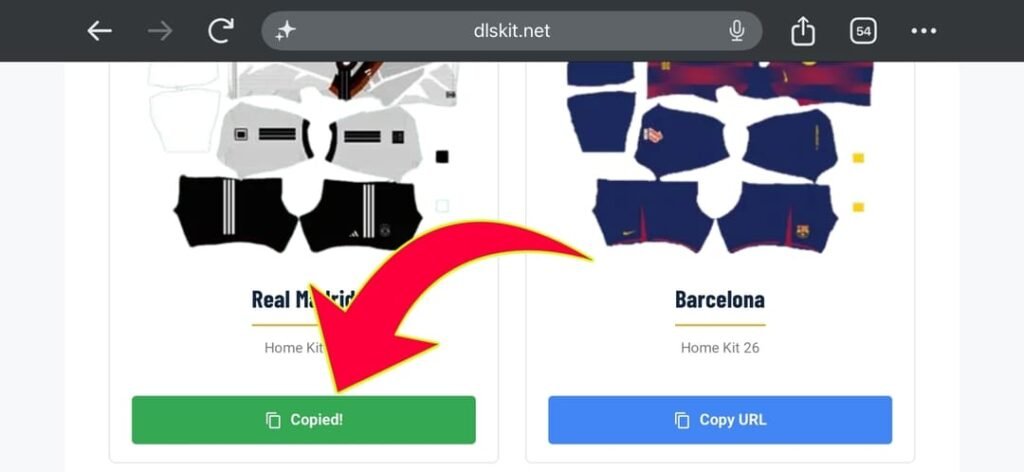
Copy the URL
If the site offers a copy button, make use of it. Typically, dragging the address out of your browser’s location bar will give you the page address instead of the image, and this is the most common reason for failed imports.
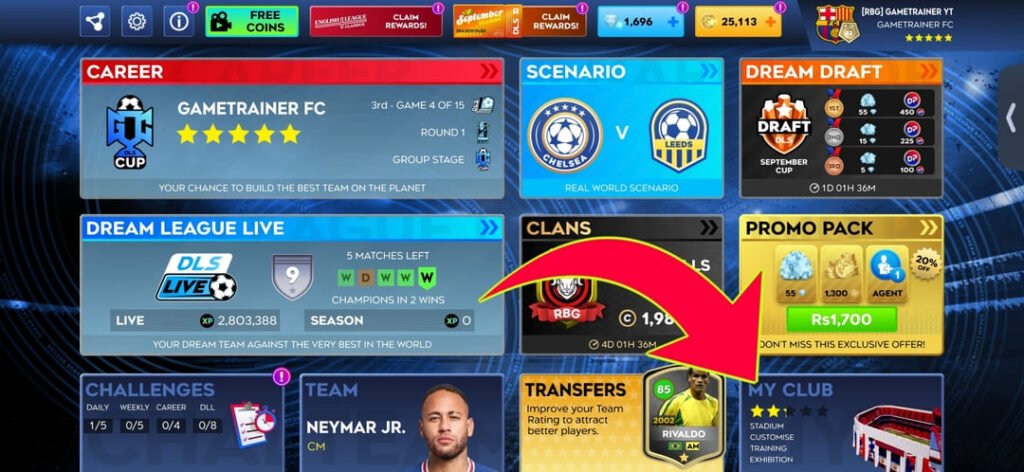
Tap Open Dream League Soccer and tap My Club
After loading the game, this is on the main menu.
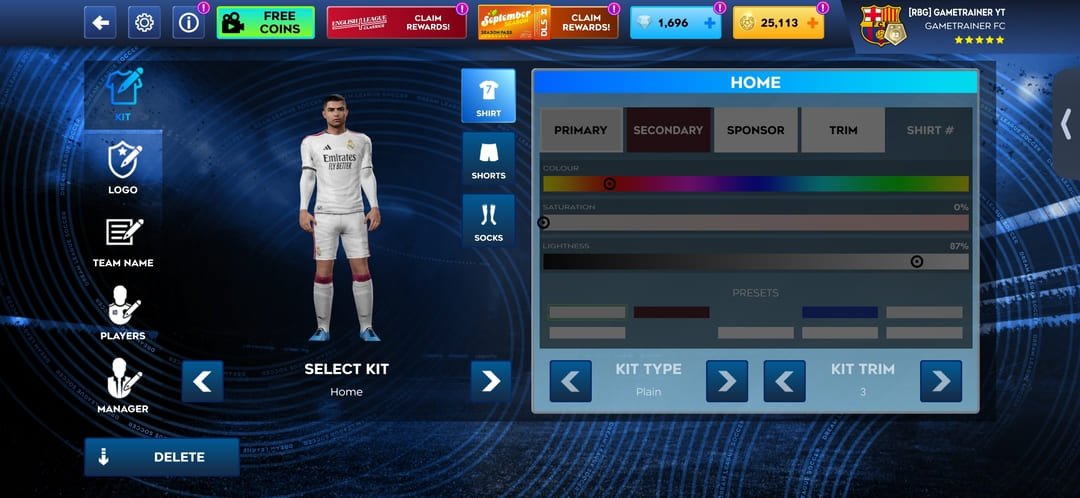
Choose Customise
It is located in your club menu, along with your squad and stadium selections.
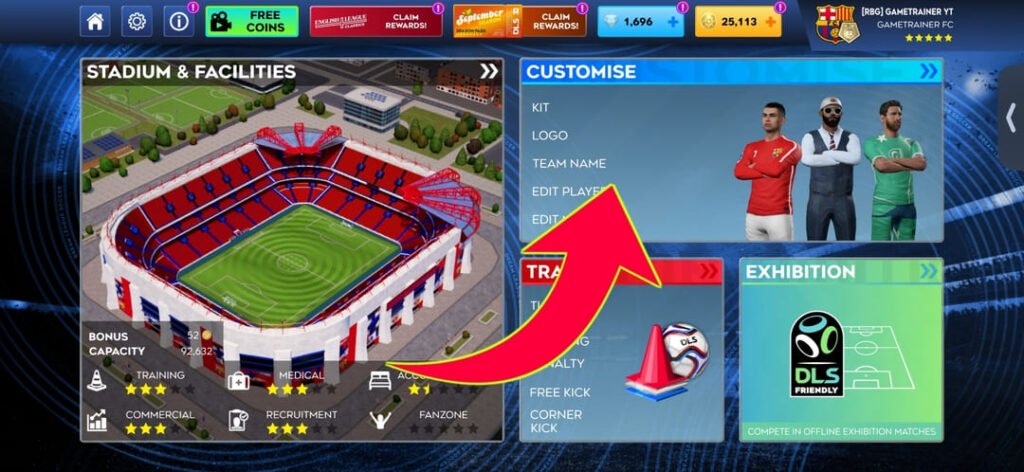
Open the Kit tab
Not Logo. Kits and badges are not the same system, and are not in the same slot.
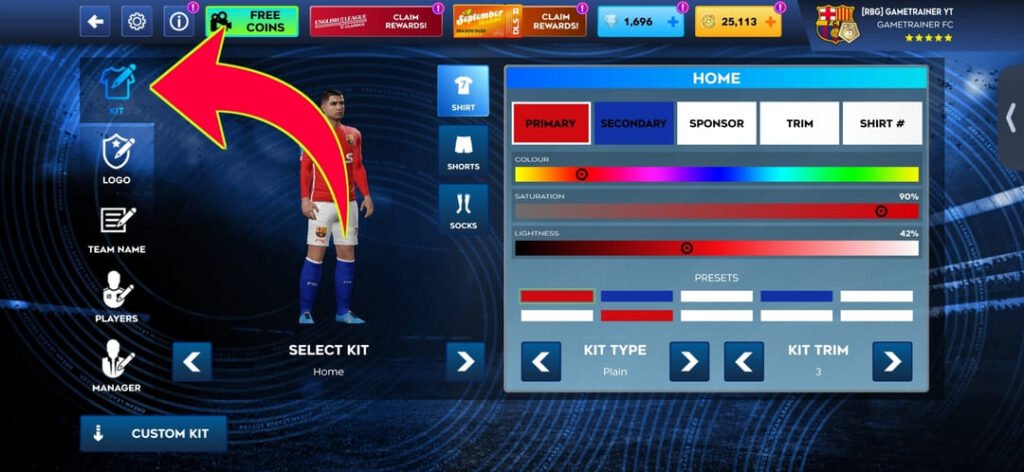
Tap Custom Kit
It’s located at the bottom of the screen. The prompt is shown here if you haven’t unlocked the feature.
Choose your slot
Click on the Select Kit arrows to navigate to Home, Away, Third and Goalkeeper. Be sure to have the correct one displayed as the game will use the kit that is selected.
Paste and confirm
Tap and hold on the URL field, then tap Paste and then tap Confirm. The game downloads the picture and instantly applies it.
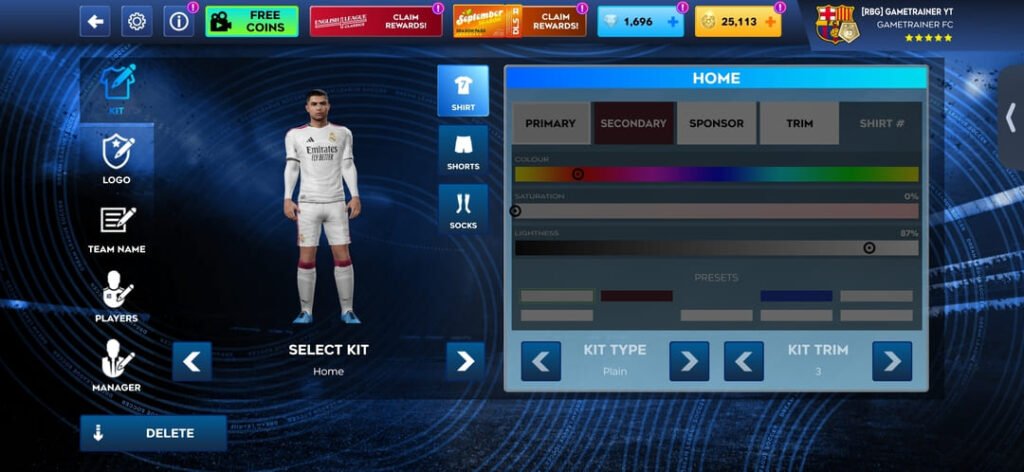
Repeat for each slot
It is not possible to import a complete set in one step. Four kits = 4 times through this.
A few older versions of the game refer to the button as Download instead of Custom Kit, and some versions have Edit Kit instead of the Kit tab. The same sequence is repeated.
What a DLS kit file actually is
This is where most of the issues people encounter lie and few guides pay attention to it.
A kit file is not an image of a shirt. It’s a texture map that is applied to a 3D player model, and it wraps around it.
The 512×512 square is divided into specified areas. One part is the front of the shirt, another the back, and other parts are the left and right sleeves. There are designated areas for shorts and socks. Each region will be imported and extended across the respective portion of the model in Dream League Soccer.
That’s why it’s possible to have a thumbnail that looks great, and import it badly. When the designer has created the file with a different layout, the artwork is placed in the wrong position. Body patterns are captured in sleeves, sponsors slip on the ribs, stripes are cut at the seams.
It’s also the reason that you can’t just cut out a shirt from a picture and use it. The picture needs to be drawn on the template.
The test: Take a look at a shirt that has something down the center of the shirt such as a vertical stripe or a stacked logo. If this element is bent, then your player model was constructed with a different template, you need to offset or split it.
Size, format and hosting
512 by 512 pixels
Exactly. If it’s smaller, it’s stretched out across the model and it comes soft, and that’s where the blurred patterns and jagged edges are. Typically, anything bigger won’t load.
PNG
Other formats may be acceptable, but PNG is the standard that the community is based on, and is used by nearly every kit site. If you don’t have a reason not to, use it.
Not transparent
The opposite of the rule for badges. The logo should be transparent so that it will look clean on the shirt. A kit must have solid colour filling in all areas of the template as the game is not about sticking a sticker on a model, it’s about painting a model.
Under 1 MB
Larger files will time out on slower connections.
Publicly accessible. The link must be able to function without login. Typically, Google Drive, Dropbox and social media links are not going to work as they are pointing to a viewer page that has scripts and permission checks around the image, not the image itself.
Setting all four slots
Dream League Soccer provides you with 4 kit slots: Home, Away, Third and Goalkeeper.
The goalkeeper is the one that everyone forgets. The three custom kits are immediately noticeable when all four are displayed on the team screen. Don’t say you’ll return to it, do it in the same session as the others.
If you are creating a real club, it’s worth the extra minute to match the slots with reality. The away shirt in your third position will appear slightly incorrect each time the team sheet loads.
Why imports fail
There are five causes, in approximately the order they occur.
The link is not an image
By a wide margin the most common. The extension of the URL should be .png. To obtain the actual address and not the page address, long press the image and select Copy image address, not Copy link address.
The file is the incorrect size
Below 512×512 is imported, but looks soft. It is not uncommon for it to outright reject above it.
The template is not matched
Import is successful but the design is not placed correctly on the model. This cannot be corrected in the game, you will need a different file.
The link is dead
Free image hosts remove images after a while of inactivity and enable hotlink protection, which means that images are not served to outside sites. A URL that used to work, often doesn’t now. This is the reason why the old forum posts’ kit links are so rare.
No relationship, or a slight relationship
As you confirm, the game is downloading a file. Even if all is right with the request, it can time out on a poor mobile signal.
If it looks like it has imported, but you still have the old kit, go back to the main menu and come back in, or close and reopen the game. Occasionally the display retains the last image.
Changing or removing a custom kit
When importing a new kit into a slot, it will replace anything already in the slot, so there is no need to clear anything first. Each time you put in a new URL, the old design disappears.
If you wish to return to a built-in design, instead of another custom design, the kit editor still has the game’s built-in templates and colour options, and you can choose one of them to override the imported image.
Kits and logos are not the same process
It’s worth clarifying, as they are often confused.
They both support 512×512 PNG images, both are pasted from a URL into the import box, but that’s about it.
A logo is cut out in a circle and affixed to the chest. Near the corners and edges of your image, anything is cut off. It should be placed on a clear background. It’s in the Logo section.
A kit is unrolled on a 3D model in various areas. No crops are cut, but all must be in the right spot. It should not be translucent. Placement: Kit section.
The most frequent error is putting a badge file in a kit slot, resulting in a huge crest covering the entire torso.
Doing all this on one phone
A minor nitty-gritty detail that makes it a lot less aggravating.
You’re constantly switching back and forth between your browser and the game, and both Android and iOS clear the clipboard in certain situations. If you lose a URL in the middle, copy all of the links you wish to use into a notes app, and then go through them sequentially.
This also means that you retain the links. Custom kits and badges are not stored in your account, and will be lost if you reinstall the game or switch phones. A saved list makes that an evening’s work a couple of minutes.
FAQ
How to import a kit in Dream League Soccer?
Copy a direct 512×512 PNG URL, then in the game, go to My Club, Customise, the Kit tab and tap Custom Kit. Click on the slot you wish to use, paste the URL and confirm. Each slot is imported separately.
Are custom kits available for import in DLS for a fee?
The custom kit importer can be unlocked for a one-time purchase of 300 Diamonds. Once it’s there, it remains on your account and you can import as many kits as you want without any additional charge.
How big does a DLS kit need to be?
512 by 512 pixels, PNG, under 1 MB. A kit file should not be transparent, unlike a logo, as the template must be solid colour in all regions.
Why won’t my DLS kit import?
Typically, the link will be to a web page and not an image file. A working URL will have the .png extension. Dead links, wrong file sizes and a weak internet connection are the other common causes.
Why is my kit not fitting my player?
The file was created using a different template. The kit image is unwrapped in different regions for the front, back and sleeves, and if they don’t match the game’s layout, the design is placed in the wrong spot.
May I import all four kits at the same time?
No. Home, Away, Third and Goalkeeper are four different slots and each must be imported individually.
What’s the difference between importing a kit and importing a logo?
A logo that is cut into a circle with a transparent background. A kit is wrapped around a 3D player model and should be solid colour all over. They access various parts of the customise menu.
Are custom kits lost when reinstalling the game?
Custom kits are not imported into your account, but stored on the device, which means a reinstall or new phone will require importing again. Save your URL somewhere.
3 thoughts on “How to Import DLS Kit in Dream League Soccer – Full Guide”